Computers and Electronics
Sub Category

We use computers every day! But what ARE computers and how do they work? Puppet Topher meets his friend Ulka, a computer programmer, who explains to kids how computers work. This is a basic Intro to Computers and Programming for Kids - if you like this video, let us know and we'll make more videos on this topic!
In this video, you'll learn about the difference between Hardware and Software, and how to write very good computer programs by giving careful instructions. Topher writes his first computer program - How to make a Peanut Butter Sandwich. It's not quite as easy as he thinks it will be!
Do you use computers? Are you interested in learning how to program? Tell us about it in the comments!
Want to learn about BINARY NUMBERS?
http://bit.ly/Binary4Kids
❤❤❤❤❤
We Recommend the fun and educational delivery boxes from Steven Spangler:
Spangler Science Club - Interactive Science Activities delivered every month
https://shareasale.com/r.cfm?b=1241388&u=1564522&m=81604&urllink=&afftrack=
For Teachers: Really Good Box of Stuff - new themed educational box delivered each month (something for you and something for your class)
https://shareasale.com/r.cfm?b=1223138&u=1564522&m=81604&urllink=&afftrack=
❤❤❤❤❤
You may like some of our other Puppet Science videos:
Electricity for Kids http://bit.ly/2nYu5Su
The Moon for Kids http://bit.ly/2EfDr3b
Solar Eclipse for Kids http://bit.ly/2wRwy4Z
Lunar Eclipse for Kids http://bit.ly/2BCpDxI
Dinosaurs for Kids http://bit.ly/2nWltwP
The Heart for Kids http://bit.ly/2EhRiWO
Is This a Planet? http://bit.ly/2wowJmO
Stars and Constellations for Kids http://bit.ly/StarsForKids
Don't forget to SUBSCRIBE to see all our newest videos!
http://bit.ly/1MJY7Cd
❤❤❤❤❤
We recommend these fun books about computers for kids:
My First Coding Book
https://amzn.to/2HbIXpj
Crack the Code! Activities, Games, and Puzzles that Reveal the World of Coding
https://amzn.to/2JRjrr7
Kano Computer Kit - Build a computer & Learn to Code
https://amzn.to/2vnM7ED
Fire7 Kids Edition Tablet with Kid-Proof Case
https://amzn.to/2HGeIYj
❤❤❤❤❤
Written by Kimberly Hatch Harrison
Performed Michael Rosenbaum and Ulka Mohanty
Produced by Kimberly Hatch Harrison and Michael Harrison
❤❤❤❤❤
Creative Commons Picture Credits:
Intel Core i5 Processor
https://en.wikipedia.org/wiki/....File:EBIntel_Corei5.
Author: highwycombe
CuBox
https://en.wikipedia.org/wiki/File:Cubox.png
Author: Gareth Halfacree

Here is a video about parts of computer class 1 || how to teach parts of computer to class 1 kids.
This video will surely help you and your kids to learn computer in a very easy way.
Watch and learn with video till end.
Subscribe our channel for more videos.
#partsofcomputer
#computerparts
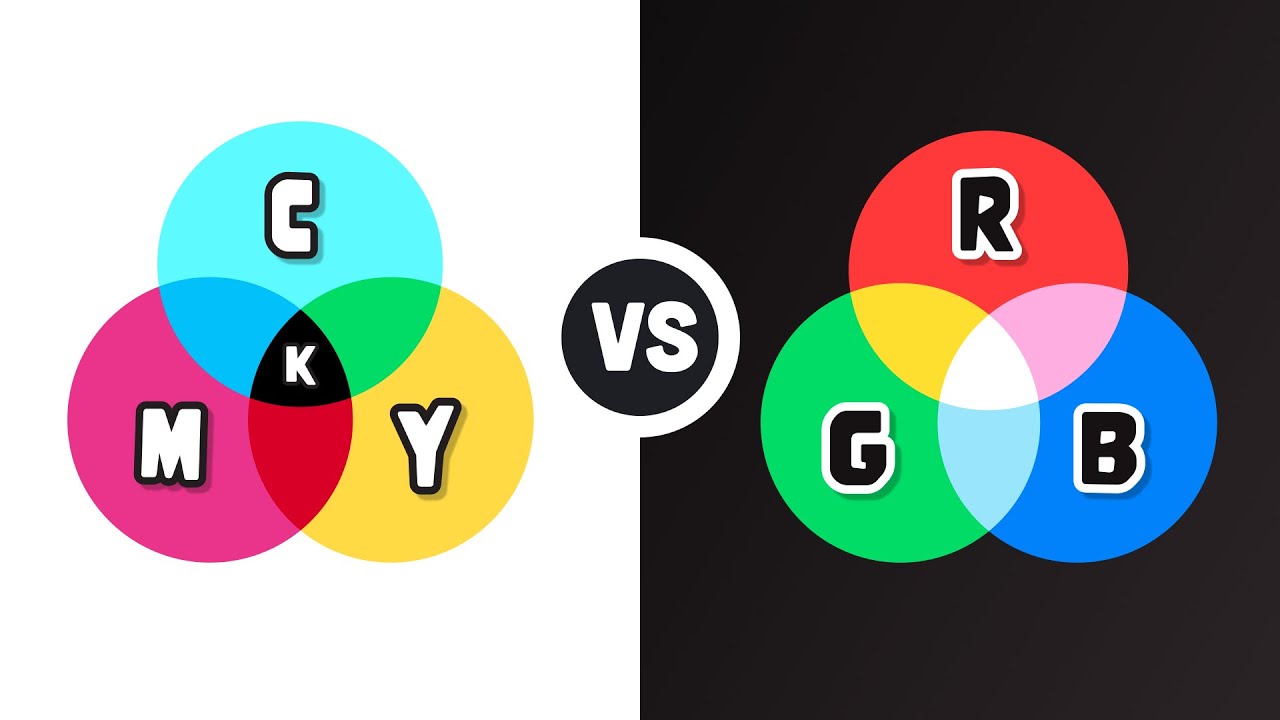
Computer screens use red, green, and blue RGB as pixel colors, but why? They told us in kindergarten that RBY were the primary colors...
#shorts #design #compsci

What is cloud computing? Cloud computing refers to data and applications being stored and run on the cloud rather than being on your local computer or on-premises equipment. AWS - Amazon Web Services is the biggest cloud provider.
#cloud #cloudcomputing #aws
►Try Aura 14 days for FREE: https://aura.com/powercert (Fraud & Identity Protection, VPN, Antivirus, Password Manager, Parental Control) partner

Setup your Gaming PC Build properly with this beginners guide!
My PC & Setup Gear - Ex review sample (RS), Ex sponsored video (SV)
Affiliate Links:
(When you buy through an affiliate link, PC Centric may receive a commission on the sale - as an Amazon Associate I earn from qualifying purchases)
My PC Case: (RS) https://locally.link/DrQk (Amazon)
My Desk (RS): https://locally.link/YsRq (Amazon)
My Oak 'Desk' Worktop: https://locally.link/Pbt0 (Worktop Express)
A great 1440p 165hz Gaming monitor (RS): https://locally.link/YckK (Amazon)
4K Benchmarking monitor (RS): https://locally.link/LFMl (Amazon)
My Personal Monitor (SV): https://locally.link/K3OB (Amazon)
Philips Hue Strips: (SV) https://locally.link/YZKl (Amazon)
My Keyboard (SV): https://locally.link/qUrE (Amazon)
My Mouse (SV): Logitech G Pro Superlight: https://locally.link/z7Ra (Amazon)
My Work Mouse (RS) - Logitech MX Master 3: https://locally.link/d00b (Amazon)
My Mouse Mat (S) - Corsair RGB: https://locally.link/ZPAa (Amazon)
Philips Hue Bulbs (S): https://locally.link/6Ixp (Amazon)
Philips HUE Play (S): https://locally.link/lf4m (Amazon)
My Desk 'Legs' Alex Drawers: https://locally.link/KN7V (IKEA)
My Desk Worktop: https://locally.link/SmiT (Worktop Express)
My animated wallpapers: https://twitter.com/PcCentric/....status/1029664428197
Noblechairs ICON Chair (RS):
OCUK: http://bit.ly/2GMZSxs
Amazon: https://locally.link/wYNM
---
My Main Camera - Blackmagic Pocket 6K: https://locally.link/E9Ci (Amazon)
My Main Lens: https://locally.link/mMmF (Amazon)
My Main Microphone: https://locally.link/11HF (Amazon)
--
Subscribe to PC Centric for weekly PC, gaming and tech videos!
Follow @PcCentric on Twitter https://twitter.com/PcCentric
Add PC Centric on Instagram: https://instagram.com/pccentric/
Like PC Centric on Facebook!
https://www.facebook.com/PcCentric
--
Music:
Epidemic Sound
--
All images used in this video are used in good spirit, and are believed to be ‘fair use’. If you feel an example of your work has been wrongly published, please contact pccentric@gmail.com.
PC Centric is a participant in the Amazon EU Associates Programme, Amazon Services LLC Associates and Amazon CA Associates, affiliate advertising programmes designed to provide a means for sites to earn advertising fees by advertising and linking to Amazon.co.uk, Amazon.com & Amazon.ca and other global Amazon Stores

Jim gets a new computer. What could go wrong?

Want to support me?
https://www.patreon.com/H3Vtux
A FEW IMPORTANT NOTES:
1: At the end I said cooling is not required. I went off script here, I meant to say "additional cooling". Any fans your CPU or case comes with are most certainly required.
2: A GPU is technically a component within the Graphics card (CPU is to Computer as GPU is to Graphics card) but if you're thinking about building a computer the terms are used interchangably. Every graphics card comes with a GPU inside of it and they are often referred to as GPU because that is the defining characteristic of a graphics card.
3: Solid State Drives are the same thing as hard drives, just with less space and faster speed due to the lack of spinning disks.
4: A GPU is technically not an *essential* part of a computer. You can boot without it. But to do almost anything desktop computers are good for, you will need a grahpics card.
A brief explanation of what each component in a home PC does.


In this course, you will learn basics of computer programming and computer science. The concepts you learn apply to any and all programming languages and will be a good base onto which you can build your skills.
This video is meant for those who are interested in computer science and programming but have no idea where to start and have little to no background information on coding.
✏️Course created by Steven and Sean from NullPointer Exception. Check out their channel: https://www.youtube.com/channe....l/UCmWDlvMYYEbW42B8J
⭐️ Course Contents ⭐️
⌨️ (00:05) Introduction
⌨️ (01:37) What is Programming?
⌨️ (06:19) How do we write Code?
⌨️ (11:44) How do we get Information from Computers?
⌨️ (14:46) What can Computers Do?
⌨️ (20:43) What are Variables?
⌨️ (25:02) How do we Manipulate Variables?
⌨️ (31:54) What are Conditional Statements?
⌨️ (37:54) What are Array’s?
⌨️ (44:26) What are Loops?
⌨️ (49:37) What are Errors?
⌨️ (55:22) How do we Debug Code?
⌨️ (1:00:25) What are Functions?
⌨️ (1:09:52) How can we Import Functions?
⌨️ (1:13:45) How do we make our own Functions?
⌨️ (1:21:56) What are ArrayLists and Dictionaries?
⌨️ (1:27:38) How can we use Data Structures?
⌨️ (1:36:27) What is Recursion?
⌨️ (1:43:42) What is Pseudocode?
⌨️ (1:50:40) Choosing the Right Language?
⌨️ (1:55:34) Applications of Programming
--
Learn to code for free and get a developer job: https://www.freecodecamp.org
Read hundreds of articles on programming: https://freecodecamp.org/news


Chad's Recommended Tools
------------------------
Anti-Virus: https://chadstechtips.com/recommends/av/
VPN: https://chadstechtips.com/recommends/vpn/
Domain Registrar: https://chadstechtips.com/recommends/namecheap/
Get Your Personal Information Off The Internet: https://chadstechtips.com/recommends/incogni/


Check out my PC gear and recommended tech: https://www.amazon.com/shop/mryeester
Recommended Thermal Paste: https://amzn.to/3i3HK83
Ryzen 5 3600: https://amzn.to/3eYfQsc
B450 Tomahawk Max: https://amzn.to/3iSSGoa
Red Devil 5700xt: https://amzn.to/3rz6tEq
Dell 1440p 165hz monitor: https://amzn.to/2VfUDTx
As an Amazon Associate I earn from qualifying purchases.

Here's Presenting The Dr. Binocs Show SEASON 2 - Inventions
Learn all about the Invention Of Computer Programming Language from Dr. Binocs himself
Producer: Neha Barjatya
Creative Head: Palvisha Aslam
Written By: Punya Mohanty
Voice Over Artist: Joseph D'Souza
Illustrators: Aashka Shah, Atul Todankar & Pranav Korla
Animators: Rupesh Hire, Sushant Hodage, Tushar Ishi & Yogesh Nikam
VFX Artist: Prasad Mane
Background Score: Parth Parekh
Sound Engineer: Mayur Bakshi
Share on Facebook - https://goo.gl/ReM3BW
Tweet about this - https://goo.gl/JR72i7
Catch Dr.Binocs At - https://goo.gl/SXhLmc
To Watch More Popular Nursery Rhymes Go To - https://goo.gl/CV0Xoo
To Watch Alphabet Rhymes Go To - https://goo.gl/qmIRLv
To Watch Compilations Go To - https://goo.gl/nW3kw9
Catch More Lyrical At - https://goo.gl/A7kEmO
Subscribe : http://www.youtube.com/subscri....ption_center?add_use
Like our Facebook page: https://www.facebook.com/peekabootv
SUBSCRIBE to Peekaboo Kidz:http://bit.ly/SubscribeTo-Peekabookidz
Catch Dr.Binocs At - https://goo.gl/SXhLmc
To Watch More Popular Nursery Rhymes Go To - https://goo.gl/CV0Xoo
To Watch Alphabet Rhymes Go To - https://goo.gl/qmIRLv
To Watch Compilations Go To - https://goo.gl/nW3kw9
Catch More Lyricals At - https://goo.gl/A7kEmO
Like our Facebook page: https://www.facebook.com/peekabootv

Today, We will be downloading and running even more dangerous viruses I could find on the deep web / dark web. (unknown viruses are the best ones.) These malwares were created explicitly by people who want to be anonymous. This list is in no specific order and we will only be covering the most dangerous computer viruses on the dark web starting with the technetium virus.
Check out my Patreon for exclusive content that can't be uploaded to YouTube! ▶ https://www.patreon.com/cryptonwo
Socials:
My second channel ▶ https://www.youtube.com/channe....l/UCWzxRQH_ymfY4UL8a
Instagram ▶ https://www.instagram.com/kryptonwo
Twitter ▶ https://twitter.com/kryptonwo
Tiktok ▶ https://www.tiktok.com/@kryptonwo
Snapchat ▶ https://t.snapchat.com/Mlk91feb
Reddit ▶ coming soon
Music/Videos/Sources/Outro used ▶
https://www.epidemicsound.com/referral/945zc1
https://youtu.be/wgKvOI9-_Vw
https://youtu.be/S0bOq801zO0
https://youtu.be/Wqj_EaCCdTI
https://youtu.be/pRxbadh-j5U
https://youtu.be/CksRpon92Pc
Current sub count: 814k
tags: I downloaded the most dangerous computer viruses, virus, windows 11, technetium virus, computer virus, virus computer, malware, i downloaded the most dangerous virus, trojan, iloveyou virus, viruses, downloading viruses for fun, computer viruses, destructive viruses, pc, The World's Most Dangerous Computer Viruses
For business inquiries/fanart/if you just want to write me: cryptonwo@gmail.com
Why are you looking this deep into the description? Comment "hodl crypto" if you're reading this. Have a lovely day.

grab this coupon for an Ender 3 S1 3D printer for $199! https://micro.center/YEE012
parts list for this PC build: https://micro.center/0kj
need new thermal paste? www.yeesterpaste.com

Quantum computers aren’t what you've been told.
Get Surfshark VPN at https://surfshark.deals/CLEO - Enter promo code CLEO for 83% off and 3 extra months free!
Subscribe to support optimistic tech content (and see the next episode with MKBHD!): https://www.youtube.com/cleoabram
Subscribe to Marques here: https://www.youtube.com/mkbhd
You’ve heard about quantum computers. Maybe you’ve seen the “race for quantum supremacy” between governments and companies, or read that quantum computers will break all encryption, or heard terms like “qubits” or “superposition” or “quantum mechanics” in a confusing tv segment. But you might be wondering… what does a quantum computer actually DO? And how could it actually affect my life?
@mkbhd and I had the same questions. Marques and I both realized quantum computing was this big important technology… that we didn’t really understand. So we decided to go on an adventure to learn the truth about quantum computers. And we're taking you with us, to show you what we learn as we learn it. But more importantly, to show you how these crazy computers might actually impact YOUR life... sooner than you think.
Chapters:
00:00 What is a quantum computer?
02:00 Why is quantum computing important?
04:00 The Quantum Video Game analogy
06:33 Thank you Surfshark!
07:40 What does a quantum computer look like?
09:38 How does a quantum computer work?
12:00 What is a quantum computer good for?
13:21 Will quantum computers break all encryption?
15:22 What's the future of quantum computing?
16:27 Updating the Quantum Video Game analogy
You can find me on TikTok here for short, fun tech explainers: https://www.tiktok.com/@cleoabram
You can find me on Instagram here for more personal stories: https://www.instagram.com/cleoabram
You can find me on Twitter here for thoughts, threads and curated news: https://twitter.com/cleoabram
Bio:
Cleo Abram is an Emmy-nominated independent video journalist. On her show, Huge If True, Cleo explores complex technology topics with rigor and optimism, helping her audience understand the world around them and see positive futures they can help build. Before going independent, Cleo was a video producer for Vox. She wrote and directed the Coding and Diamonds episodes of Vox’s Netflix show, Explained. She produced videos for Vox’s popular YouTube channel, was the host and senior producer of Vox’s first ever daily show, Answered, and was co-host and producer of Vox’s YouTube Originals show, Glad You Asked.
Additional reading and watching:
- For more from the IBM team, I love the Qiskit YouTube Channel https://www.youtube.com/@qiskit
- Quantum Physics: What Everyone Needs to Know by Michael G. Raymer https://www.goodreads.com/en/book/show/35498912
- Totally Random, Why Nobody Understands Quantum Mechanics by Tanya Bub and Jeffrey Bub (a comic about quantum mechanics!) https://www.goodreads.com/en/book/show/36642373
- How Quantum Computers Break The Internet... Starting Now by Veritasium https://youtu.be/-UrdExQW0cs
- Quantum Computers Explained – Limits of Human Technology by Kurzgesagt https://youtu.be/JhHMJCUmq28
- Quantum Computers, Explained With Quantum Physics by Quanta Magazine https://youtu.be/jHoEjvuPoB8
- The Map of Quantum Computing by Domain of Science https://youtu.be/-UlxHPIEVqA
Vox: https://www.vox.com/authors/cleo-abram
IMDb: https://www.imdb.com/name/nm10108242/
Gear I use:
Camera: Sony A7SIII
Lens: Sony 16–35 mm F2.8 GM and 35mm prime
Audio: Sennheiser SK AVX
Music: Musicbed
Follow along for more episodes of Huge If True: https://www.youtube.com/cleoabram?sub_confirmation=1
—
Welcome to the joke down low:
There are 3 types of people in this world:
Those who understand quantum computing
Those who do not understand quantum computing
And those who both simultaneously do and do not understand quantum computing ;)
Use the word “type” in a comment to let me know you’re a real one who read to the end!

See The Full & Uncensored Interview Before It's Released
https://www.youtube.com/channe....l/UCs-6DggHVL7MySP0_
Follow us on Instagram @CamCaponeNews
https://www.instagram.com/camcaponenews
https://twitter.com/camcaponenews
https://www.tiktok.com/@camcaponenews
Podcast
Spotify Link
https://open.spotify.com/show/....4yCfmuO4vCG2kAeCOUTH
Apple
https://podcasts.apple.com/us/....podcast/the-cam-capo

Want to support me?
Patreon: https://www.patreon.com/H3Vtux
A short explanation of binary.
Upon reviewing the finished video I realized I made a mistake in some of my vocabulary. A byte can represent a number up to 255 but it can actually represent 256 different VALUES, as 0 is a value in and of itself. Rerecording and reanimating would be a painful process, so forgive me this mistake.
